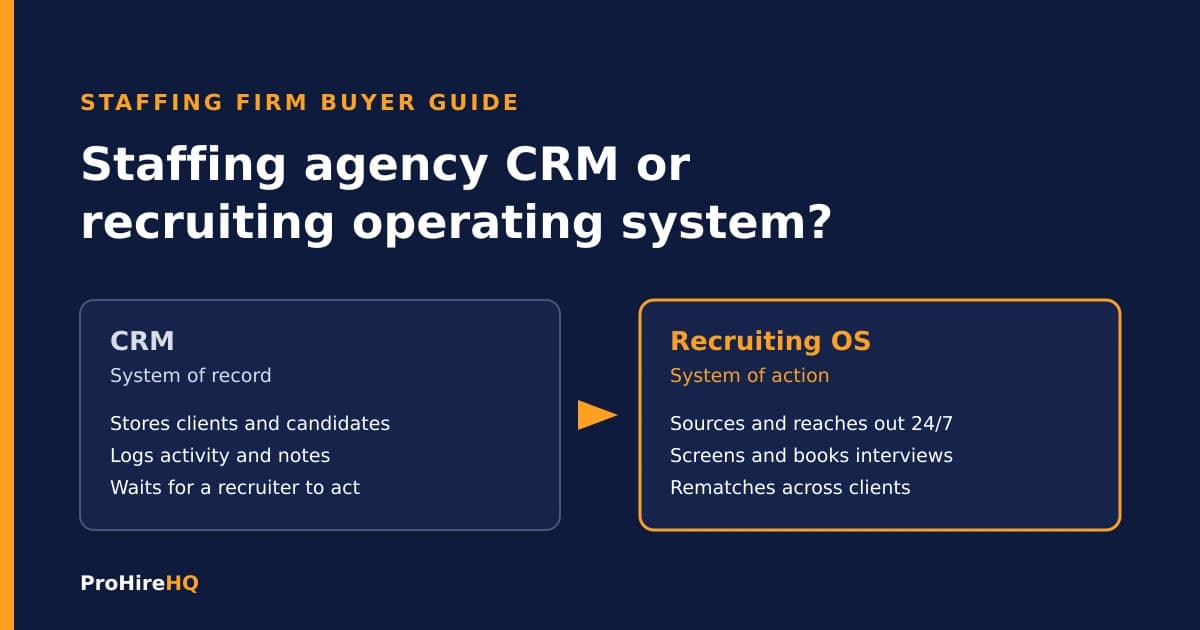
If you run a staffing firm, you already know the pitch for a staffing agency CRM. Keep every client, every candidate, and every conversation in one place. That pitch is true. A good CRM is the memory of your business.
Here is the part nobody says out loud in the demo: a CRM remembers. It does not recruit. It will tell you who you talked to last March. It will not go find the person you need by Friday, text them tonight, screen them, and put them on a recruiter's calendar.
I have spent 17 years placing people, and the firms I watch win are not the ones with the cleanest database. They are the ones that move first. So before you buy, switch, or bolt another tool onto your stack, it helps to be clear on what each type of system is actually built to do.
What a staffing agency CRM does well
A staffing agency CRM is a system of record for relationships. In most firms it covers some mix of:
- Client and contact management. Accounts, hiring managers, notes, and job orders.
- Candidate records. Profiles, resumes, history, and status.
- Activity tracking. Calls, emails, and tasks logged against each record.
- Pipeline visibility. Where each job order and each candidate sits right now.
- Reporting. Activity and placement numbers for the team.
Many firms run this inside an applicant tracking system, and the line between the two keeps blurring. The classic split is simple: an ATS tracks applicants moving through a specific job, and a recruiting CRM manages relationships with people over time, including the ones who never applied. If you want the longer version of that difference, we break it down on our recruiting CRM page.
None of that is a knock. You need a system of record. Without one, your firm lives in inboxes and spreadsheets and walks out the door when a recruiter quits.
Where a CRM stops
The trouble is what happens between the records.
A CRM waits for a person to act. A recruiter has to search the database, decide who to call, write the message, send it, chase the reply, book the screen, and update the status. Every one of those steps is manual, and every one of them happens during business hours, one recruiter at a time.
That is where placements leak:
- The job order lands and nobody works the old database. You have hundreds of qualified people in your system from past searches. Nobody reaches out to them because nobody has time to.
- The applicant comes in at 9 PM. Your team sees it the next morning. By then the candidate has heard from someone else.
- The candidate gets rejected at one client and goes cold. You paid to source that person. They were good enough to submit. Now they sit in a status field forever.
- Follow up dies after the second try. Not because recruiters are lazy, but because there are only so many hours in a day.
The volume in this industry makes the problem bigger. According to the American Staffing Association, America's staffing companies hired 12.7 million temporary and contract employees during 2023. At that scale, the firm that responds first and follows up longest wins a lot of placements that never show up in anyone's CRM report.
What a recruiting operating system adds
A recruiting operating system is not a fancier database. It is the layer that does the work the database is waiting on. Think system of action, not system of record.
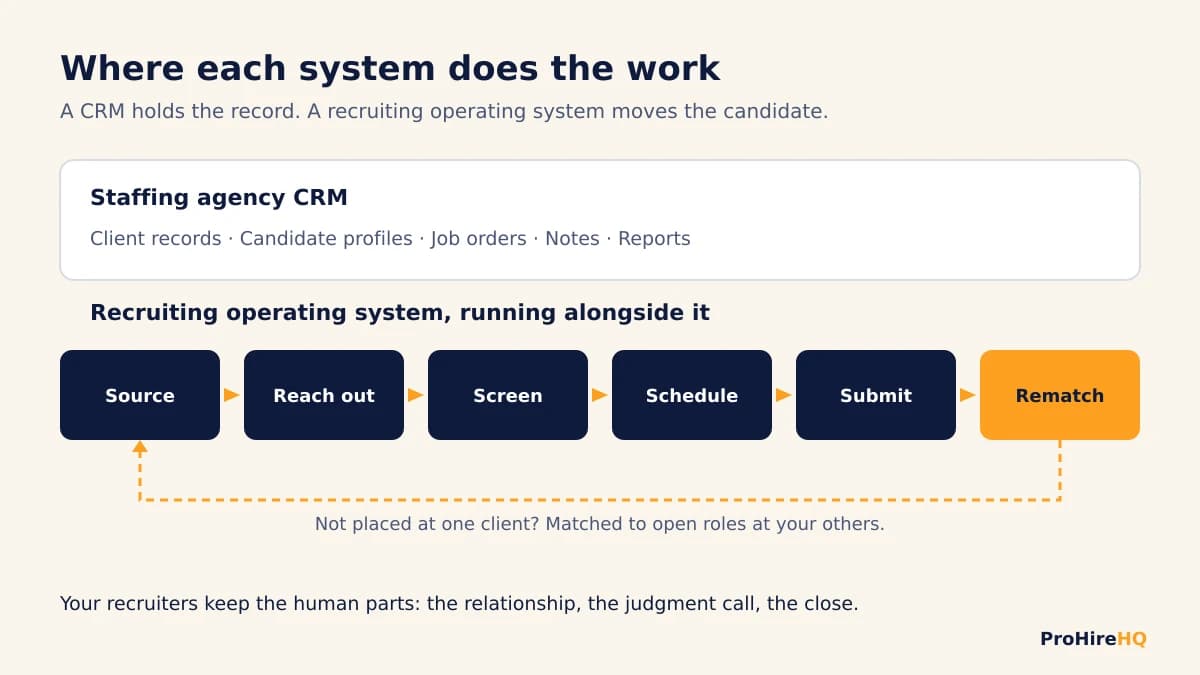
In practice, that means:
- Sourcing that runs continuously. Open roles get worked every day, not only when a recruiter has a free hour.
- Outreach across channels. Text and email sequences reach candidates where they actually answer, with compliant opt in and opt out handling.
- Instant response. A new applicant or a missed call gets a reply right away, day or night, so the first touch is yours. We wrote more about why that window matters on our speed to lead page.
- Screening before the call. Availability, location, and license questions get answered in the conversation, so your recruiter talks to people who already fit.
- Self scheduling. Qualified candidates book straight onto a recruiter's calendar instead of trading voicemails.
- Rematching. A candidate who did not get the offer at one client gets matched to open roles at your other clients automatically, instead of going cold.
Your recruiters still do the human parts: the relationship, the judgment call, the close. The operating system handles the repetitive motion that eats their day. If you want to see the automation pieces one by one, our recruiting automation software page walks through them.
A buyer checklist for staffing firm owners
Whatever you are evaluating, ask these questions in the demo. They separate a place to store work from a system that does work.
- Does it start outreach on its own? When a new job order opens, does the system reach the right people in your existing database without a recruiter building a list by hand?
- What happens after hours? If a candidate applies at night or on a Sunday, who responds, and how fast?
- Does it screen in the conversation? Can candidates answer qualifying questions by text before they ever reach a recruiter?
- Can candidates book themselves? Or does every screen still require phone tag?
- What happens to rejected candidates? Do they get matched to other clients' roles, or do they just get a status change?
- Is messaging compliant? Ask how consent, opt outs, and carrier registration for business texting are handled.
- Can your clients see your brand? If you offer clients a portal or job board, does it carry your name and logo?
- Does it work with what you already have? Ripping out your system of record is expensive and risky. You should not have to.
- Can you see the work being done? Every message, reply, and booking should be visible to your team, not hidden in a black box.
If a tool answers most of those with "your recruiter does that," it is a CRM. That might be exactly what you need. Just do not buy it expecting it to speed up hiring on its own.
Keep your system of record. Add speed alongside it.
Most firms do not need to throw anything out. If your ATS or CRM holds your history cleanly and your team knows it, keep it. The question is not which database is best. The question is what is working your candidates between the moments when a recruiter touches them.
That is the gap a recruiting operating system fills. It runs alongside your system of record, so you keep your data and your workflows while the sourcing, outreach, follow up, and scheduling stop depending on how busy your team is this week.
How ProHireHQ works for staffing and recruiting firms
ProHireHQ is the recruiting operating system I built so firms can source and recruit people faster. There are two versions: one for staffing and recruiting firms and one for employers hiring directly. The staffing version is built around speed to hire:
- Sourcing, screening, and multichannel outreach that run 24/7.
- Instant replies to new applicants and missed calls, so you are first in line.
- Screening and self scheduling inside the text conversation.
- Automatic rematching of candidates across your full client roster, so a rejection at one client becomes an opportunity at another.
- A white label portal and job board your clients see under your agency's name.
- License verification and compliance checks built in as features, not as the whole product.
You can see how the staffing version fits together on our page for agencies. If you would rather walk through your own pipeline with me, book a consult and we will look at where your firm is losing candidates today.
Frequently asked questions
What is the best CRM for a staffing agency?
The best CRM for a staffing agency is the one your team will actually keep updated, that tracks clients, job orders, and candidates in one place, and that connects to the tools you use for outreach. For most firms the bigger question is what happens after the record is saved. If your CRM only stores data, pair it with a system that sources, follows up, and schedules for you.
What is the difference between an ATS and a recruitment CRM?
An applicant tracking system follows applicants through a specific job, from application to hire. A recruitment CRM manages relationships with people over time, including passive candidates who have not applied yet. Many staffing tools now combine both, but the core difference is job tracking versus relationship building.
Does a staffing agency need both an ATS and a CRM?
Many staffing agencies use both, or one platform that does both. You need a reliable system of record for jobs and candidates either way. What firms often lack is the layer on top that does outreach, screening, and scheduling automatically, which is where most speed is won or lost.
What is a recruiting operating system?
A recruiting operating system is software that does the recruiting work around your records: continuous sourcing, multichannel outreach, instant response, screening, self scheduling, and rematching candidates to open roles. A CRM is a system of record. A recruiting operating system is a system of action that runs alongside it.
Can I keep my current ATS or CRM if I add a recruiting operating system?
Yes. A recruiting operating system is meant to work alongside your system of record, so you keep your data and workflows while the repetitive outreach and follow up run automatically.